
KAKUCUT GUIDE
On-device captions,
edited on iPhone.
Updated October 4, 2026 · By KakuCut
KakuCut turns speech in a video you select into editable captions on your iPhone. You can correct words, adjust timing, split lines, and choose how captions sit in the frame—without sending the source video to a KakuCut account or server.
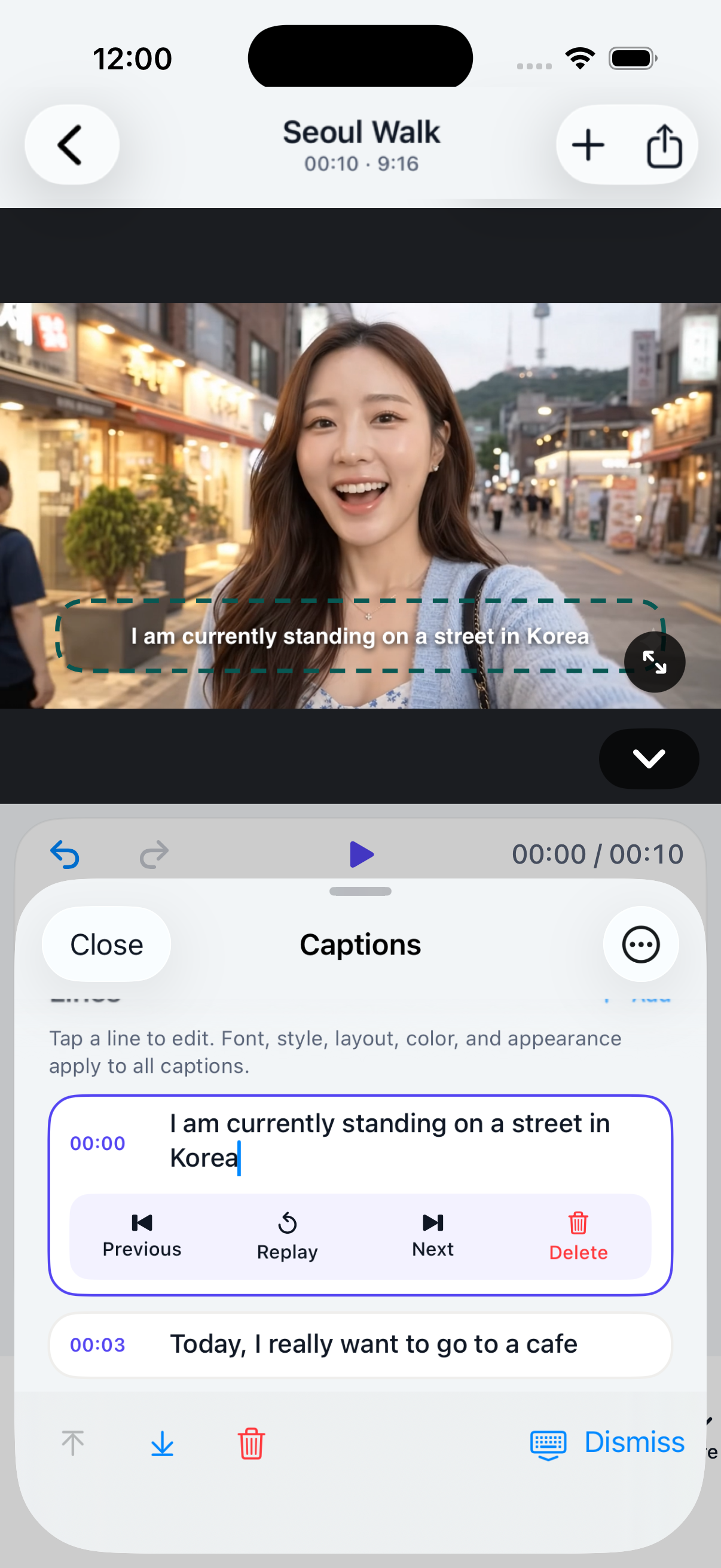
What happens when you caption a video?
- Choose a video from your library and add it to a KakuCut project.
- KakuCut uses the speech capabilities available on your iPhone to create caption segments from the video’s audio.
- Edit the words, timing, line breaks, style, and placement in the caption editor.
- Export an MP4 with captions, or an SRT when you need the caption file separately.
What stays on your device?
Your selected videos, project media, caption edits, and exports stay on your iPhone while you work. KakuCut does not require an account and does not run a server that receives or stores your source videos, captions, or exports. Read the full Privacy Policy for permissions, optional font downloads, diagnostics, and support email.
Availability
KakuCut requires an iPhone running iOS 17 or later. Caption availability depends on the selected language, device support, available on-device speech models, and the audio in the source video. On supported iOS 26 devices, KakuCut uses its primary on-device SpeechAnalyzer caption workflow.
Start with one clip
Use a short clip first, review the generated words, then make the small timing and line-break edits that help a caption feel intentional.
Download KakuCut on the App Store ↗